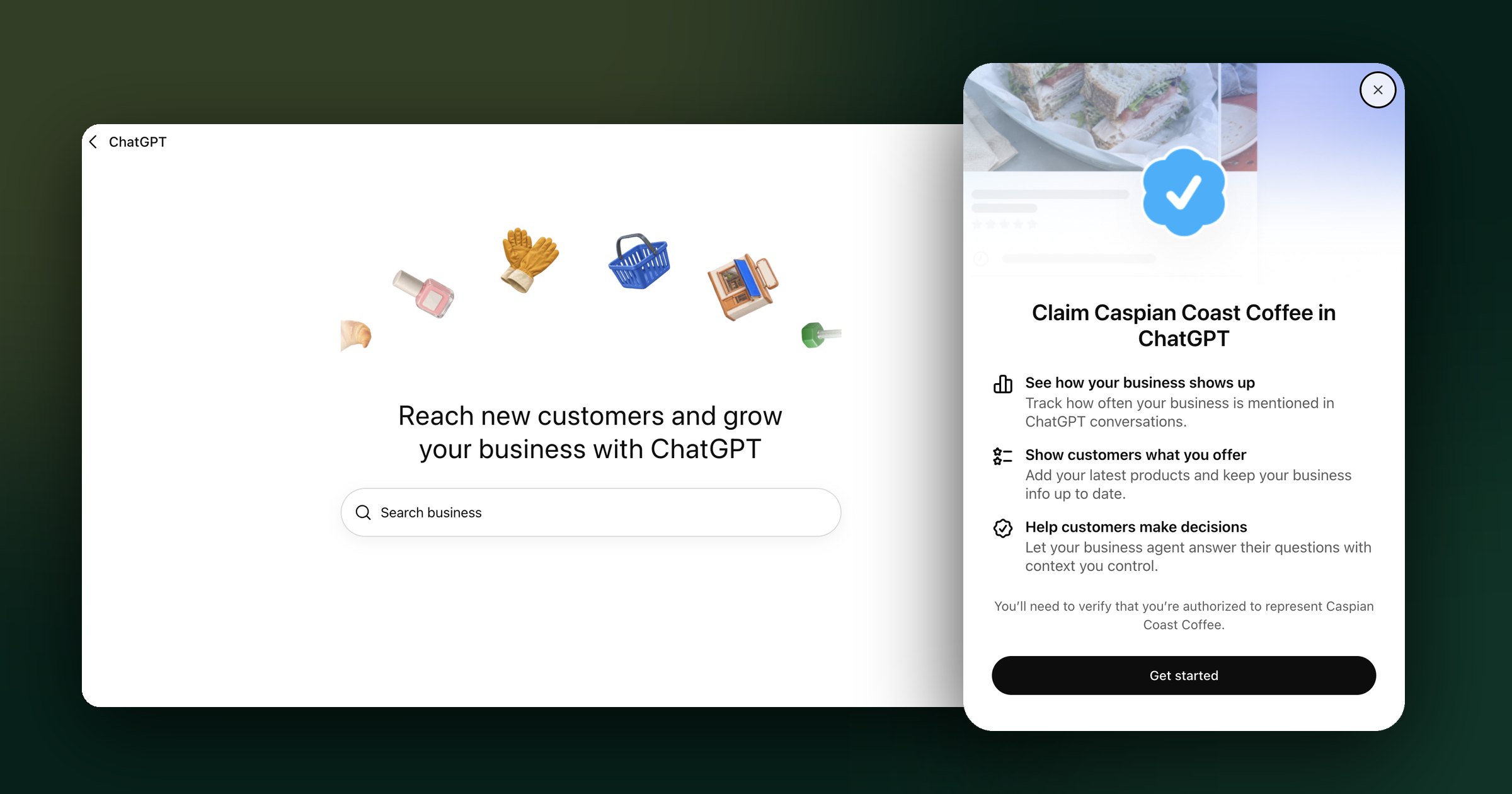
Key takeaways
- OpenAI launched Businesses in ChatGPT (beta) on November 10, 2026. Owners claim and manage profiles at chatgpt.com/business-hub.
- Claiming takes two gates: claim verification (phone, DNS TXT, or another offered method), then Persona identity verification.
- Persona approval unlocks editing, product feeds, the verified badge, and 28-day Insights: mentions, website clicks, and discovery topics.
- Eligible U.S. ecommerce and online-service businesses can publish a Business Agent. It answers questions but can’t yet complete purchases or bookings.
- Claiming doesn’t guarantee ranking. Allow OAI-SearchBot, publish verifiable proof, and measure monthly.
- The bigger shift: from B2B and B2C toward A2A, agent-to-agent commerce.
In this guide
For years, businesses have optimized to be found by people. We built websites for human eyes, wrote advertisements for human attention, and measured the clicks that brought a prospect from one screen to another.
But the person looking for your business is increasingly asking an AI to do the looking.
On November 10, 2026, OpenAI launched Businesses in ChatGPT, a beta that lets eligible organizations claim a business profile, update key information, and see aggregated data about how they appear across ChatGPT. Through Business Hub, companies can also provide product information and, if eligible, publish a Business Agent that can answer prospective customers' questions. OpenAI says ChatGPT now serves 1.2 billion weekly users. That makes this considerably more than a new place to list an address or upload a logo. 1
If you own or manage a business, you can begin at chatgpt.com/business-hub. The walkthrough below covers the claim and verification process, what the data actually tells you, and how to prepare for an agent if your business qualifies.
I also shared my perspective in this LinkedIn video. The practical steps here go further, down to the verification methods and the DNS settings that can trip up even technically sophisticated business owners.
My immediate comparison is Google Business Profile combined with some of the diagnostic value of Google Search Console. It is useful shorthand, though not a perfect comparison. Business Hub is not a full search-ranking console, and its insights do not expose the individual questions people ask.
The more interesting development is what comes after the profile.
I've spent years working at the intersection of branding, AI product communications, and how companies become discoverable in answer engines. At MOW, we're already building websites and information architectures for clients so that an AI system can understand what a company does, when it is relevant, and what evidence supports its claims. I have worked on this from two vastly different angles: Avitia, an AI-driven healthcare business, and All Model Repair, a neighborhood automotive shop in Los Angeles. The underlying discipline is the same: make the business unmistakably itself, then make that identity understandable to machines as well as people.
Business Hub gives that work a new, more direct surface. And it brings into focus a thesis I've been developing: the next evolution of commerce moves beyond business to business (B2B) and business to consumer (B2C) toward agent to agent (A2A).
The first two are established business models. A2A is my name for the emerging relationship in which a company-side AI representative and a buyer-side AI assistant conduct parts of discovery, evaluation, qualification, and eventually transactions on their principals' behalf. That full experience is not what Business Hub delivers today. Yet the architecture is beginning to take shape.
What OpenAI Actually Launched
There are four distinct products or capabilities worth separating:
| Capability | What it does | Availability and limitation |
|---|---|---|
| Businesses in ChatGPT | A business profile that customers may encounter from a ChatGPT answer | Beta. Eligible businesses can claim existing profiles; availability depends on location, type, and verification. |
| Business Hub | The owner-facing area to claim, verify, edit, and analyze a business profile | Available to eligible businesses where ChatGPT operates and verification is supported. |
| Business Agent | A branded, clearly labeled AI representative that answers questions about a business's offerings | Currently for eligible U.S. ecommerce and online-service businesses with a website, subject to policy and approval. |
| Sponsored Business Agent | An advertiser-funded chat destination that people can choose from an eligible ChatGPT ad | Being tested and rolled out to eligible advertisers; it is not generally available to every ad account. The Ads Manager setup is currently separate from Business Hub. |
One naming distinction matters: ChatGPT Business, the paid team-workspace subscription, is a separate product. You do not need to buy that subscription, sign up for ChatGPT Enterprise, or run ads simply to claim an eligible business in Business Hub. 23
This also means you cannot assume your business suddenly has a controllable, guaranteed top-ranking placement. OpenAI explicitly says that claiming a business does not dictate its independent recommendations, and sponsored placements remain separate from those answers. 2
How to Claim Your Business in ChatGPT: A Practical Walkthrough
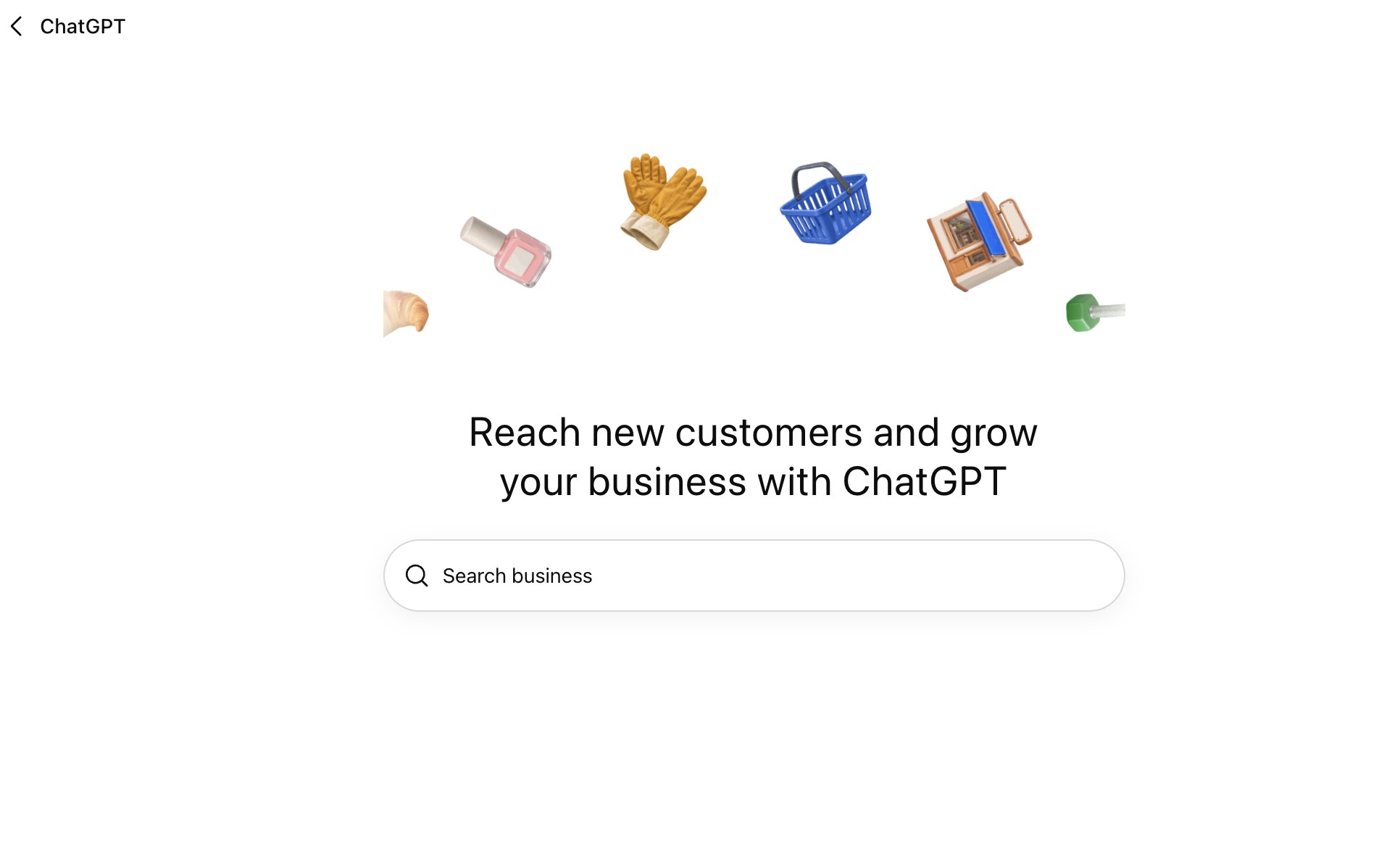
Start here: chatgpt.com/business-hub
If you're signed out, ChatGPT will take you through sign-in before opening Business Hub. Set aside a little time and have control of your business domain or phone handy. You will also need to prove that you are authorized to represent the company.
Before you begin, have these items ready:
- Your company's public name, legal name, website, and address or service area.
- Access to the business phone number or the DNS settings of the company's domain.
- A business owner or authorized representative who can complete identity verification, potentially with government-issued photo identification, business registration details, and authorization documents.
- A ChatGPT account that should remain the long-term administrator. If you are an agency, arrange for an authorized owner to claim the business and then grant you access; don't build the client's ownership around a contractor's personal login.
There are two separate gates, and conflating them is the most common source of confusion:
| Gate | What you prove | What happens next |
|---|---|---|
| Claim verification | You control a recognized connection to the business—such as its phone number or domain. | OpenAI reviews and approves access to the business in Business Hub. |
| Persona identity verification | You are a real person authorized to act for the business. | After OpenAI approval, you can publish edits, see Insights, connect product feeds, and create an eligible Business Agent; the verified badge can appear. |
OpenAI documents both gates in its official setup guide. 2
Step 1: Find your business
- Open ChatGPT Business Hub and sign in with the account you intend to use for management.
- From the hub, select Add business (or use the Business Hub entry in the ChatGPT sidebar).
- Search by the company name. If you manage several locations, check the address carefully; a parent-brand claim does not automatically claim every location.
- Select the matching listing and confirm the ChatGPT account that will become its manager.
- Read the methods offered for that particular listing. Choose the one you can complete reliably, then follow the prompts.
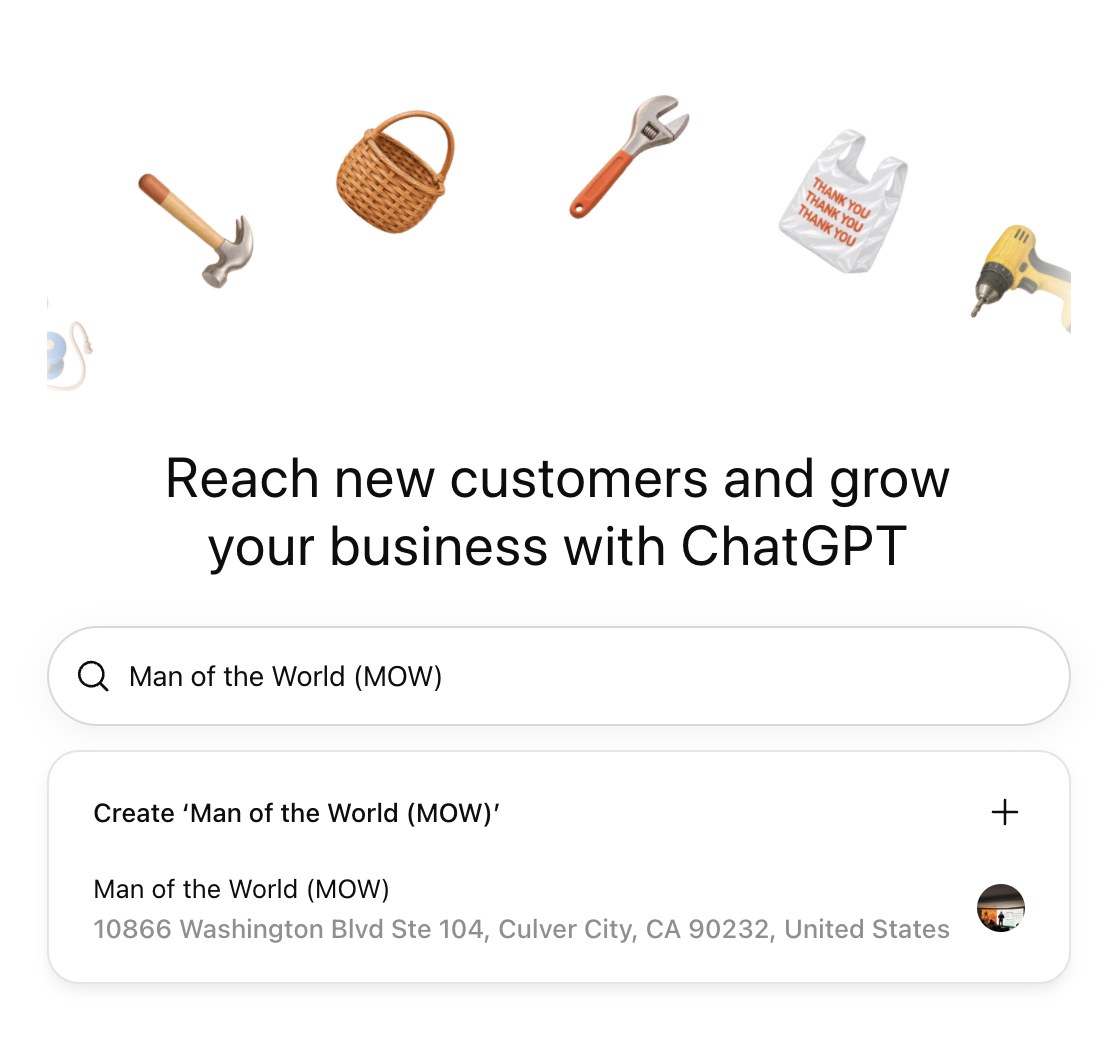
Can't find it? Search a recognizable name variant and check whether you are in the correct location. An eligible online business may see an option to add its business. Local stores and restaurants currently can claim only existing U.S. listings. If a listing is locked, use Contact support. If another person has claimed it, open the profile's three-dot menu and choose Dispute ownership; you will be asked to establish your authority through Persona. A claimed listing is not necessarily more visible than an unclaimed one. 2
Step 2: Verify your relationship to the company
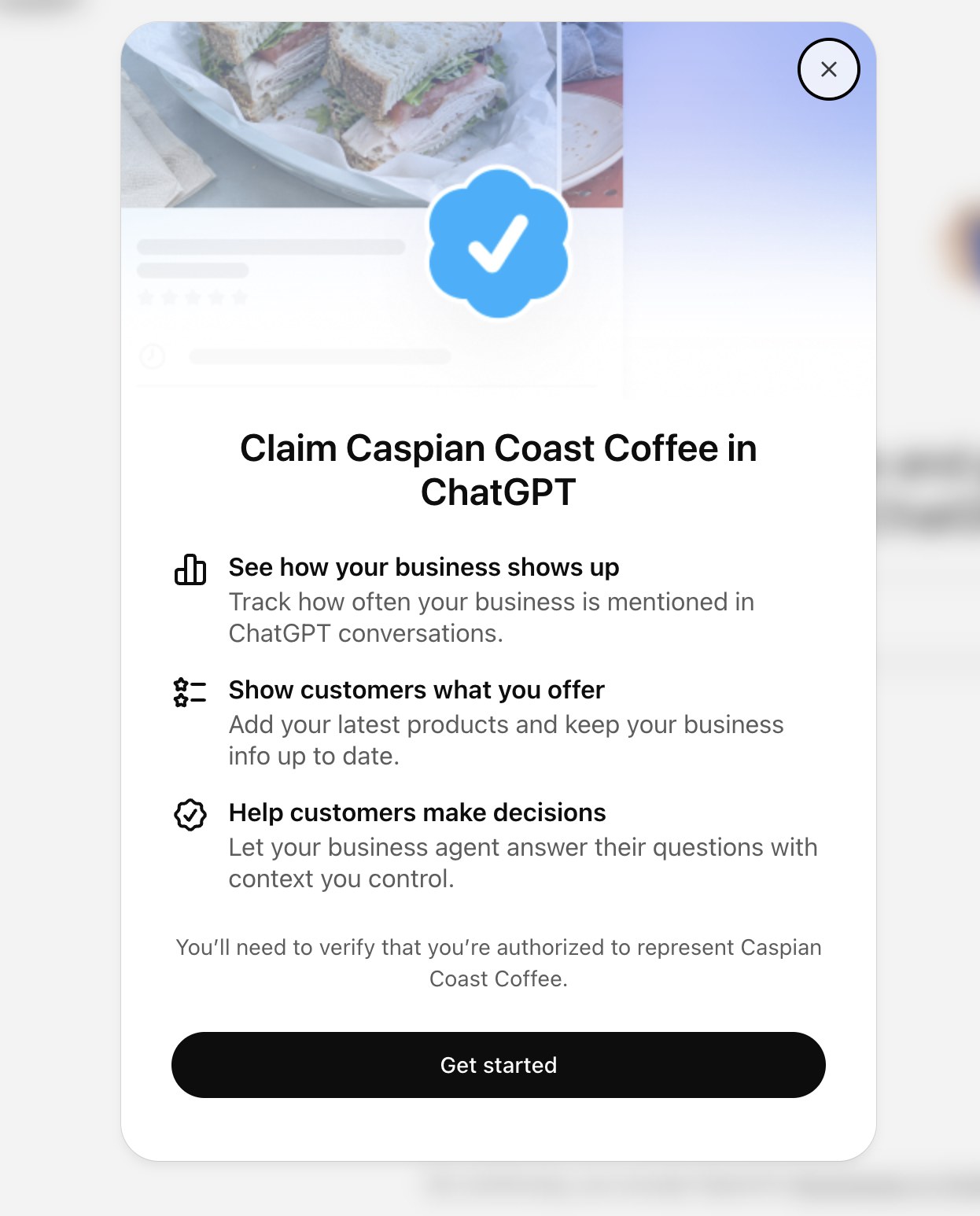
The methods offered depend on the listing. OpenAI's setup guide describes business phone, an email code, a DNS TXT record on your domain, and a Shopify connection. When we started the claim for our client Caspian Coast Coffee, ChatGPT offered Business phone and Website domain. Choose the option you can complete reliably; you don't need to attempt every method.
Option A: Verify by business phone
- Select Business phone.
- Choose SMS or automated call, depending on what the interface offers for the listed number.
- Select Get code.
- Receive the code at the business number displayed and enter it into ChatGPT.
Check that someone can actually receive the message or call at the number shown. A voice-only landline may be better suited to the automated call option. If the phone number is outdated or inaccessible, don't try to verify through a number you do not control; use another offered route or contact OpenAI Support.
Option B: Verify by DNS TXT record
This is the route I would favor when the organization has reliable access to its domain settings, especially if its public phone number is outdated or difficult to receive codes on. It demonstrates control of the company's domain, but you still need the second identity-verification stage.
- In Business Hub, choose Website domain. ChatGPT will display a unique DNS verification record. Leave that screen open and copy its exact record type, name/host, and value.
- Sign in to the service that actually hosts your domain's authoritative DNS records. This may be your registrar, but it could instead be Cloudflare or another hosting provider. If the domain is registered at GoDaddy but uses Cloudflare nameservers, you normally make the change in Cloudflare, not in GoDaddy.
- Find DNS or DNS Management, then Add record.
- Set Type to TXT. Populate Name/Host and Value/Content with exactly what ChatGPT supplied. Use the provider's default TTL unless you have a reason to change it. Some providers expect
@for the root domain, and others expect a short prefix rather than the full domain—follow the provider's formatting rules without altering OpenAI's intended hostname. - Save the new TXT record. Add it; do not replace or delete unrelated TXT records used by email or other services. Do not change the site's A, AAAA, CNAME, or MX records for this step.
- Give DNS time to publish. Return to Business Hub and choose Verify domain, then follow any remaining instructions.
What the fields mean:
| DNS field | Enter |
|---|---|
| Type | TXT |
| Host / Name | The exact host ChatGPT provides, formatted as your DNS provider requires |
| Value / Content | The unique verification string ChatGPT provides—do not use a value copied from a blog or screenshot |
| TTL | The DNS provider's default is usually fine |
Where to add the TXT record: GoDaddy's TXT-record walkthrough · GoDaddy's explanation of who manages your DNS · Cloudflare's DNS-record instructions. Those links explain the provider controls; the verification value itself must come from your own Business Hub claim screen.
If ChatGPT says it cannot find the record, first verify that you edited the DNS provider actually serving the domain and that you used the correct host. DNS propagation can take time; GoDaddy says many changes take effect within an hour, but some can take up to 48 hours globally. Advanced users can check public TXT responses with dig TXT your-hostname.example.com (substitute the complete hostname for which ChatGPT asked you to create the record) before retrying the verification button. 8
After either route: OpenAI reviews your claim and emails a decision or request for more information. While a claim is under review, Business Hub may offer Cancel claim. Passing this stage does not yet unlock Insights or profile editing. 2
Step 3: Complete Persona identity verification
Once OpenAI approves the business claim, you must complete a second stage through Persona, OpenAI's identity-verification flow. Domain control proves someone can edit DNS. It does not prove that the person submitting the claim has authority over the organization.
- Open your claimed business in Business Hub. Look for Complete verification with Persona in the overview.
- Select Verify, then Verify with Persona → Continue to Persona when those prompts appear.
- Complete the identity and business-authorization checks. Depending on the request, prepare a government-issued ID, business registration details, and evidence that you own the company or are authorized to act for it.
- Check the alignment of the legal business name, street address, and any registration or tax number against the official records you provide. A mismatch can delay or derail approval.
- Submit through the official Persona flow and wait for OpenAI's email confirming approval or requesting more information. Submitting is not approval. If you receive a failure or expiration notice, follow the email's instructions and use Try again only if that option is offered.
Do not email your ID or registration documents to an unfamiliar intermediary or upload them to a third-party “verification service.” Start inside Business Hub and use its official Persona handoff.
Until Persona approval, you cannot publish edits, view Insights, connect a product feed, or create an eligible Business Agent. The profile's blue verified check also depends on Persona approval. If you don't see the option in the initial flow, return to the Business tab, select the profile, and find Complete verification with Persona. If OpenAI has said you're approved but the dashboard hasn't updated, contact OpenAI Support with the step, error, and a screenshot that excludes sensitive information. 2
One caution: If you create a new business profile using Persona, OpenAI says approval can automatically publish it. Make sure the name, ownership, and public information are ready before submitting. Published profiles cannot presently be unpublished through the ordinary setup-support process. 2
Quick troubleshooting before you give up
| What you see | What to check |
|---|---|
| No matching business | Check name and location; an eligible online business may be able to add a profile, while local stores and restaurants currently need an existing U.S. listing. |
| Listing locked / Contact support | Use the in-product support route; don't create a competing duplicate. |
| Already claimed by another party | Open the profile's ••• menu and choose Dispute ownership. |
| Phone or email code never arrives | Confirm access to the displayed destination, spam/filtering or call reception; switch methods if the interface offers another. |
| DNS verification fails | Check the authoritative DNS provider, TXT host, unique value, saving, and propagation. Leave existing email records alone. |
| Claim approved, but Insights locked | Complete Persona verification; claim approval alone is insufficient. |
| Persona rejected or stuck | Reconcile legal details with official records and follow the review email; use Try again only if offered. |
| Business Agent option absent | Check Persona status, U.S. location, ecommerce/online-service category, website, and Business Agent eligibility policy. |
If you're managing multiple brands or locations, treat them as separate claims; current Business Hub management does not automatically consolidate a parent brand and every location. Owners can invite teammates and authorized agencies inside the hub instead of sharing credentials. 2
Step 4: Build a profile that an answer engine can understand
Once verified, review your business description, website, service or product category, logo, cover image, and any relevant policies. Product sellers can add a feed containing prices and availability via Shopify, a compatible CSV, or a hosted file URL. OpenAI reviews updates before they appear; saved changes may take time to surface in answers. 2
This is where brand strategy becomes an operational advantage. A machine can retrieve your category. But your category alone rarely explains why someone should choose you.
Local businesses may feel this first. Queries like “Where should I get coffee?” and “Who's the best mechanic near me?” will increasingly be directed at AI assistants. I expect a complete, verified profile to matter, though we don't yet know how ChatGPT will weigh it against outside evidence. For a café or repair shop, Google and Yelp reviews, local reporting, and independent mentions still have an important role. Perhaps OpenAI eventually builds its own review ecosystem; that's my speculation, not an announced product. For now, I would cultivate both: an accurate first-party profile and a credible reputation beyond it.
At MOW, I start with investigative work—interviewing people across a company, understanding the product and its customers, interrogating assumptions, and finding the truth that competitors cannot claim. Clients often arrive staring at their rival, what I call the boogeyman: the brand they feel compelled to catch. Keeping up with the Joneses becomes a design and messaging strategy. The result is usually more sameness.
In an agent-mediated market, sameness will be an especially expensive problem. If five brands all say they're “innovative,” “customer-centric,” and “best in class,” there is very little useful information for an assistant to compare.
Write your Business Hub description around five specifics:
- Identity: Who are you, exactly?
- Offer: What products or services do you provide?
- Fit: For whom, in which geography, and under what circumstances?
- Evidence: What verifiable proof, qualifications, results, or distinct capabilities support the claim?
- Next step: How does someone explore, contact, book, or buy from you today?
For a local mechanic, that may mean naming the neighborhood, the kinds of vehicles serviced, the work the shop actually performs, and the human history behind the business. For a precision-medicine company, it means stating the specific technology, application, scientific status, and limits of what can legitimately be claimed. Both are branding. Both are also machine-readable business intelligence.
A practical test: Give the profile description to someone who has never heard of your company. Ask whether they can tell what you do, who you're for, and what makes your offer different without looking at your website. If they cannot, an AI system may struggle too.
Step 5: Open Insights and establish your baseline
Once Persona approval is complete, open the business in Business Hub and select Insights. OpenAI currently reports aggregated activity over the past 28 days, including:
- Mentions: For an online business, a counted mention means ChatGPT referenced its website; the name appearing by itself does not count. For a local business, a mention can be a location result even without a click.
- Website clicks: Click-throughs from ChatGPT to the business's website.
- Discovery topics: Grouped themes in answers where ChatGPT mentioned or cited the business.
OpenAI does not share customer conversations, individual search prompts, or chats with your Business Agent. Reporting is privacy-thresholded; an empty field does not necessarily mean zero activity. These are useful directional signals, not a keyword-level equivalent of Search Console. 2
My recommendation is to take a baseline screenshot or log the available numbers and the reporting period, then compare the same metrics every four weeks. Observe the themes, not just the traffic total. A company can be mentioned frequently for a service it no longer offers, or almost never for its most strategically important one. Both are actionable findings.
Step 6: Add a Business Agent—if your company is eligible
After claim and Persona approval, eligible U.S. ecommerce and online-service businesses with a website may see the option to create a Business Agent. Review the product and policy information it will use. Write clear guidelines, preview answers to real customer questions, correct errors, and choose Publish only after testing. The agent is a branded conversation, visibly separate from ChatGPT's own answer. 12
I would test at least five kinds of questions before publishing:
- Fit: “Who is this product or service right for—and who isn't it for?”
- Comparison: “How does the basic offer differ from the advanced one?”
- Evidence: “What supports that claim? Where can I verify it?”
- Boundary: “Can you guarantee this result?”
- Action: “How do I make a purchase, get a quote, or speak with someone?”
A useful first draft for the agent's guidelines is: “Identify yourself as an AI representative of [Company]. Answer using approved product, service, and policy information. Ask a clarifying question when necessary. State what is uncertain or unavailable, link to the source page when relevant, and offer a human handoff or website link for decisions you cannot complete. Never invent pricing, availability, credentials, guarantees, or policies.” Then tailor this language to the business, the agent builder's available fields, and OpenAI's policies.
An excellent agent should know where its authority ends. Current Business Agents can explain offerings and policies and direct a visitor to the website, but cannot themselves complete a purchase, book a reservation, or retrieve an order status. They must be transparent that they represent the business and cannot invent prices, outcomes, credentials, or availability. 24
If you don't see the option, it may be a category, location, policy, or rollout limitation. You can still claim a profile and improve your information even when no agent is available.
The 30-Day SEO, AEO, and GEO Plan I Would Run
Business Hub is an important piece of the measurement stack. It does not replace the website, the evidence base, or the wider information ecosystem used to build an answer.
Week 1 — Verify the entity. Claim and verify the profile. Check that your name, URL, category, location or service area, offer, and policies agree with your website and credible third-party sources. Document what ChatGPT says about you today.
Week 2 — Make the website intelligible. Audit the pages that define the business: About, services, product pages, locations, case studies, FAQ, and contact. Give each a direct answer to the question it exists to resolve. Publish verifiable proof with dates and attribution. Where appropriate, use accurate structured data. Check that important information is visible in crawlable page content. Ensure OpenAI's OAI-SearchBot is allowed to access public content intended for ChatGPT Search; its permission is distinct from the model-training crawler GPTBot. 5
Week 3 — Test the questions buyers actually ask. Draft a prompt set spanning discovery, comparison, suitability, geography, trust, price or policy, and alternatives. For example, “Which [category] providers serve [market]?” and “What should I ask before hiring a [service]?” Run consistent tests, capture citations, flag incorrect assertions, and compare with other answer engines. Don't mistake one prompt's response for a representative measurement of the whole market.
Week 4 — Close the gaps and measure. Review Business Hub's 28-day mentions, clicks, and discovery topics when available. Compare them with referral sessions and conversions in Google Analytics 4, your first-party leads, and the test-prompt log. Fix the missing source page or unsupported claim that is causing a recurring misunderstanding. Repeat monthly.
The three disciplines work together: SEO makes relevant information accessible and discoverable across traditional search; AEO organizes it into direct, reliable answers; GEO strengthens its eligibility to be used as credible context or evidence in generative answers. None can force an independent model to cite or recommend you.
The Advertisement Is Becoming a Conversation
There is an especially interesting footnote to yesterday's announcement. In September 2026, OpenAI had already begun testing Sponsored Agents—conversations users could choose after viewing a ChatGPT ad. With the November Business Hub launch, OpenAI explicitly connected Business Agents to sponsored ad destinations. Eligible advertisers can now access, or are being phased into, the ability to configure this experience in Ads Manager. 16
This is the direction I was describing when I suggested that the advertisement of the future might not be primarily visual. A company may pay for the opportunity to initiate a useful exchange, then have its AI representative explain the offer, answer objections, and help someone decide whether to go further.
There are important current limits. The customer elects to start that chat. It is sponsored and clearly labeled. It is separate from ChatGPT's independent response, and paying for it does not influence that response. Sponsored-agent access is not universal. And, as OpenAI's current help documentation notes, Business Hub agents and Ads Manager agents do not yet synchronize their configurations. An eligible advertiser builds and publishes the sponsored version in Ads Manager, then enables agent chats for an eligible conversion-optimized campaign. 67
That is still a substantial departure from an advertising model built around a headline, an image, and a click. The creative unit begins to resemble a responsive representative. Its quality will depend on the accuracy of its knowledge, the boundaries of its claims, its ability to recognize customer needs, and the care with which the brand's voice is translated into dialogue.
The implications are as much ethical as commercial: sponsorship must remain recognizable, the agent must be honest about whom it represents, and a conversation should inform the customer without manipulating them. 4
From B2B and B2C to A2A
Now follow the trajectory one step further.
Imagine a buyer tells a personal assistant: “Find three dependable providers for this service. Check whether they work in my market, compare their policies, and bring back a recommendation.”
The assistant may gather public information and present a shortlist. But a future version could communicate directly with business-side agents to clarify eligibility, request current terms, or resolve questions that no static webpage can anticipate. It might return to the buyer only when it needs judgment, consent, or approval.
That is what I mean by A2A: agent-to-agent commerce. The buying process remains human-directed, but an increasing amount of research and exchange happens between delegated representatives.
It is a forecast—not a claim that OpenAI's newly launched Business Agents can do this today. They cannot presently make bookings or purchases on customers' behalf, and OpenAI has not announced unrestricted consumer-agent-to-business-agent negotiation through Business Hub. 2
Yet the shift asks brands an immediate strategic question: What happens when your next prospect is an agent acting on someone else's behalf?
An agent may care less about how impressive a homepage looks than whether it can establish the company's identity, verify a service claim, interpret a policy, and identify the right next step. But that should not lead us to discard the human side of branding. Originality, trust, cultural resonance, and emotional memory still determine whether a recommendation means anything to the person receiving it.
I have always resisted building a brand by copying the most visible competitor. We call it the boogeyman at MOW—the rival everyone watches until they begin to look and sound exactly like it. My process moves in the opposite direction: outward into the world for unexpected ideas, and inward through investigative research for a company's singular truth. The result needs absolute conviction.
Agentic discovery makes that conviction more valuable. A generic claim is easily compressed into sameness. A specific, well-supported distinction has a chance to survive the compression of an AI-generated answer.
The next audience for your brand may be software with a mandate. Give it something true, distinctive, and useful to carry back to a person.
What Every Business Should Do This Week
- Open chatgpt.com/business-hub and look for your company.
- Claim and verify ownership, then complete Persona identity verification to unlock management and Insights.
- Audit your information as if an AI assistant, not a loyal customer, were meeting the company for the first time.
- Document your baseline for mentions, website clicks, and discovery topics; recognize the 28-day window and privacy thresholds.
- Review your website's AEO/GEO readiness, especially verifiable answers and OAI-SearchBot accessibility.
- Build and test an agent if eligible; be explicit about what it can answer and what it cannot do.
- Explore sponsored agents separately if your advertising account has access; don't assume every account can use them yet.
This is the point where brand, search, product information, and AI operations begin to meet. Companies that treat Business Hub as a one-time directory submission will get some housekeeping done. Companies that understand it as an early interface between their business and AI-mediated demand can start building the much more important capability: being accurately represented in a conversation they may never personally see.
At Man of the World (MOW), we build the websites, information architecture, and Messaging Matrix behind brands that people and answer engines can both understand. See the MOW Method, explore our services, or start a conversation.
Sources and further reading
- OpenAI, “Introducing Businesses in ChatGPT” (November 10, 2026).
- OpenAI Help Center, “Setting up your business on ChatGPT” (updated November 2026).
- OpenAI Help Center, “ChatGPT Business overview” (2026).
- OpenAI, “Business Agents Policy” (updated November 10, 2026).
- OpenAI Developers, “Overview of OpenAI Crawlers” (accessed November 11, 2026).
- OpenAI, “Reimagining advertising with AI” (September 16, 2026).
- OpenAI Help Center, “Setting up a Sponsored Business Agent in Ads Manager” (updated November 2026).
- GoDaddy Help, “Add a TXT record” (accessed November 11, 2026).
Links to keep open while you set up
Claim and verify
Optimize and measure
Related from MOW
 By Peter Weltman · Man of the World
Frequently Asked Questions
What is ChatGPT Business Hub?
Business Hub is OpenAI's management interface for eligible organizations to claim a business profile in ChatGPT, verify ownership, maintain information, access aggregated Insights, and, where eligible, create a Business Agent.
How do I add my company to ChatGPT?
Visit chatgpt.com/business-hub, sign in, select Add business, search for your company, choose the correct listing, and follow the offered claim method. If eligible and the option appears, you can add a missing online business. You must complete subsequent Persona verification for editing, Insights, and eligible agents.
Is ChatGPT Business Hub the same as ChatGPT Business?
No. ChatGPT Business is a paid collaborative workspace for teams. Business Hub is the interface for managing how an eligible organization appears to ChatGPT users. A paid team subscription is not required simply to claim a business profile.
Does claiming my business improve its ChatGPT ranking?
There is no guaranteed ranking benefit. Claiming allows a business to supply more accurate information, while ChatGPT's independent answers and recommendations may draw on other sources. Advertising does not change independent recommendations.
What analytics does ChatGPT Business Hub provide?
After verification, available Insights include aggregated mentions, website clicks, and discovery topics for the previous 28 days. Results are subject to reporting thresholds and do not expose individual user prompts, conversations, or agent-chat transcripts.
Can a Business Agent make a sale or booking?
Not in the current Business Hub experience. It can answer questions about offerings and policies and direct customers to the website, where transactions or bookings take place.
Can I advertise with a Business Agent?
Sponsored agent conversations are being tested and rolled out for eligible ChatGPT Ads accounts. A sponsored agent is a labeled, optional chat destination, managed through Ads Manager; Business Hub and Ads Manager agent settings do not currently sync.
What is agent-to-agent (A2A) commerce?
A2A is the emerging model in which a buyer's AI assistant and a business's AI representative exchange information or complete authorized parts of a commercial workflow. It describes a direction of development, not a generally available capability of OpenAI Business Hub today.